For the convenience of the citizens of India, Unique Identification Authority of India (UIDAI) has Aadhaar Self Service Update Portal. Aadhaar Self Service Update Portal allows resident to correct any mistakes in their Aadhaar by them self by visiting UIDAI Online Website Portal. On other hand this same portal can be used to update your Aadhaar Details when your Address gets changed and on certain other cases.
Previously Aadhaar Self Service Update Portal used to allow residents to update each and every details of Aadhaar like Name, Gender, Mobile, Email, DOB, Address, etc. But to increase security of Aadhaar Data, UIDAI now only allows residents to correct Address from its Aadhaar Self Service Update Portal. For rest Aadhaar Correction requests you will have to visit the Aadhaar Center Physically.
But before we proceed to explain on How to Do Aadhaar Self Update [Aadhar Self-service Update Portal], let me tell you what is the main requirement which you will need to carry out Aadhaar Update through Aadhaar Self Update Portal. The main requirement to update your Aadhaar Details Online is you should have valid mobile number registered with your Aadhaar Card, and if you had not registered mobile number while enrolling for Aadhaar Card than it is not possible to update the details of your Aadhaar Online.
Make sure the mobile number which is registered with your Aadhaar is available with you as while updating Aadhaar it will send your one time password to your mobile number which you will have to enter to authorize your ownership.
So now let’s being with the process on How to Do Aadhaar Self Update [Aadhar Self-service Update Portal].
Process on How to Do Aadhaar Self Update [Aadhar Self-service Update Portal]
As we earlier discussed that through Aadhaar Self Update Portal you can only update your Address of your Aadhaar Card. So to update Address in your Aadhaar Card, you will need Proof of Address Documents. Below are the list of documents acceptable to update your Aadhaar Details.
Supported Proof of Address (PoA) documents for Aadhaar Update:
Passport, Bank Statement/ Passbook, Ration Card, Voter ID, Driving License, Government Photo ID Cards/ Service Photo Identity Card issued by PSU, Electricity Bill (not older than 3 months), Water Bill (not older than 3 months), Telephone Landline bill (not older than 3 months), Property Tax Receipt (not older than 3 months), Credit Card Statement (not older than 3 months), Insurance Policy, Signed Letter having Photo from Bank on letterhead, Signed letter having photo issued by registered company on letterhead, signed letter having photo issued by recognized educational instruction on letterhead, NREGS Job Card, Arms License, Pensioner Card, Freedom Fighter Card, Kissan Passbook, CGHS/ ECHS Card, Certificate of address having photo issued by MP or MLA or Gazetted Officer or Tehsildar on letterhead, Certificate of address issued by village panchayat head or its equivalent authority (for rural areas), Income Tax Assessment Order, Vehicle Registration Certificate, Registered Sale/ Lease/ Rent Agreement, Address card having photo issued by departments of posts, caste and domicile certificate having photo issued by state govt., disability ID Card/ handicapped medical certificate issued by the respective State/UT Governments/ Administrations, Gas Connection Bill (not older than 3 months), Passport Spouse, Passport of Parents (in case of minor).
Arrange the document, self-attest on one of the photocopy of the document and just scan it and store it on your PC or Laptop and lets discuss further on this process on How to Do Aadhaar Self Update [Aadhar Self-service Update Portal].
- Visit Aadhaar Self Update Portal by clicking here.
- Enter your 12 digit Aadhaar Number in the field or VID Number if you don’t want to disclose your Aadhaar Number, to know how to generate VID you can refer our article how to generate VID.
- Solve the Captcha Image by entering the same characters as you can see in the image in below text verification field and click on Send OTP button.
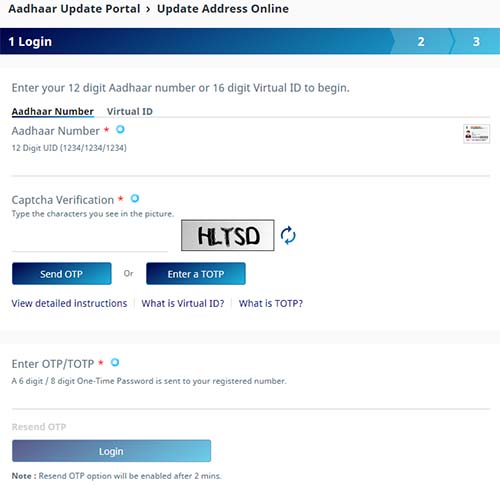
- You will receive one time password on your registered mobile number, or else you can even use TOTP app to get the OTP.
- Enter the received otp in enter otp field and click on login button. (The received OTP will be valid for 30 minutes)
- On next page there will be two options given which is Address and Address via Pin.
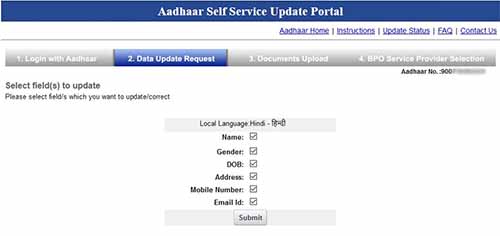
- Select first option that is Address and click on submit button.
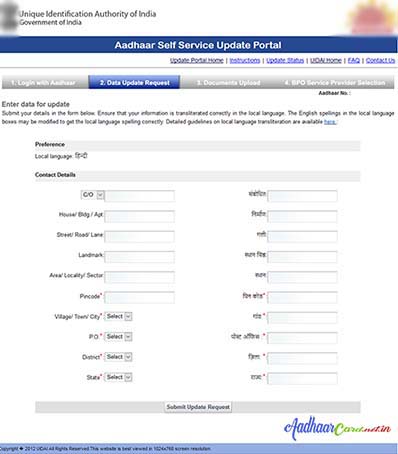
- On next page just fill in each and every details of your address correctly and click on submit update request.
- On next page it will display all details which you entered for confirmation, if all details are correct just click on submit button.
- Next you will be asked to upload the address proof documents, just upload the documents and click on submit button.
- Next you will be asked to select BPO Service Provider, select from any BPO which has good track record and click on submit it.
- You will get Update Request Number (URN) which you will have to maintain with you till your Aadhaar Address gets updated, by this URN you can keep track of your Update Request through portal. If required you can print your Acknowledgement of Aadhaar Update request or even store it on your computer for future tracking purpose.
That’s it this is how easily one can update their Aadhaar Card Details through Aadhaar Self Update [Aadhar Self-service Update Portal] from the comfort of their home or office.
Your details would get updated as per UIDAI Verification and the changes would get reflected in 2 – 3 weeks.

Please meet addar card nahi Hua islea mera aadar card Bana doooooooooo